Our new free email verification service [with API]
![Our new free email verification service [with API]](https://sendhustle-blog-images.s3.ap-south-1.amazonaws.com/blog/email-verification-service/Email-verification-featured-image-90kb.webp)
We are now offering a free email verification service. You can verify your email addresses while sending, or separately from sending. If you verify your email addresses while sending, you can substantially minimize the bounces you get back to your Inbox since only email addresses that pass verification will receive your email campaign. We also provide a web-based email verifier to verify your addresses, and we can also update your Google Sheet with a “VERIFIED” column showing a PASS or FAIL status for each address. Finally, you can use our API to integrate our email validator into your own software.
So, if you’re used to using a third-party email verification service like NeverBounce or ZeroBounce, you can stop doing that because our tool is free, accurate, and much easier to use.
What is email verification?
Email verification tests whether an email address is a valid email address or not. We do that by running two algorithms on it:
- A syntax checking algorithm to make sure the email appears valid. For example, ajay@gmail would not pass this step, but ajay@gmail.com would pass this step.
- A mail server check to ensure that the receiving server for the address will accept email for that particular address. This is done by creating an SMTP session to the remote server and issuing a series of SMTP commands, specifically the RCPT TO command, to “ask” the server if the address is valid.
Who should verify before sending emails?
Not everyone needs to be concerned with email verification. If you’re sending an email newsletter to members of your tennis club, and you know each of them personally, you likely don’t need to verify. If, however, you’re a salesperson scraping LinkedIn for leads and building a cold email list, then verifying addresses will benefit you.
How do you use the free email verification service?
There are three ways to use the email verification service: the web-based email verifier and inside GMass.
If you’re not a GMass user or you just want to use the standalone email verification service, head over to the web-based email verifier. If you want to have GMass verify all of your email addresses before sending a campaign, then just check the Verify box in your settings. Finally, you can use our API to provide email verification services inside your own app.
Option 1: While using GMass
To verify your addresses at the time you send your campaign, all you have to do is check the Verify box:
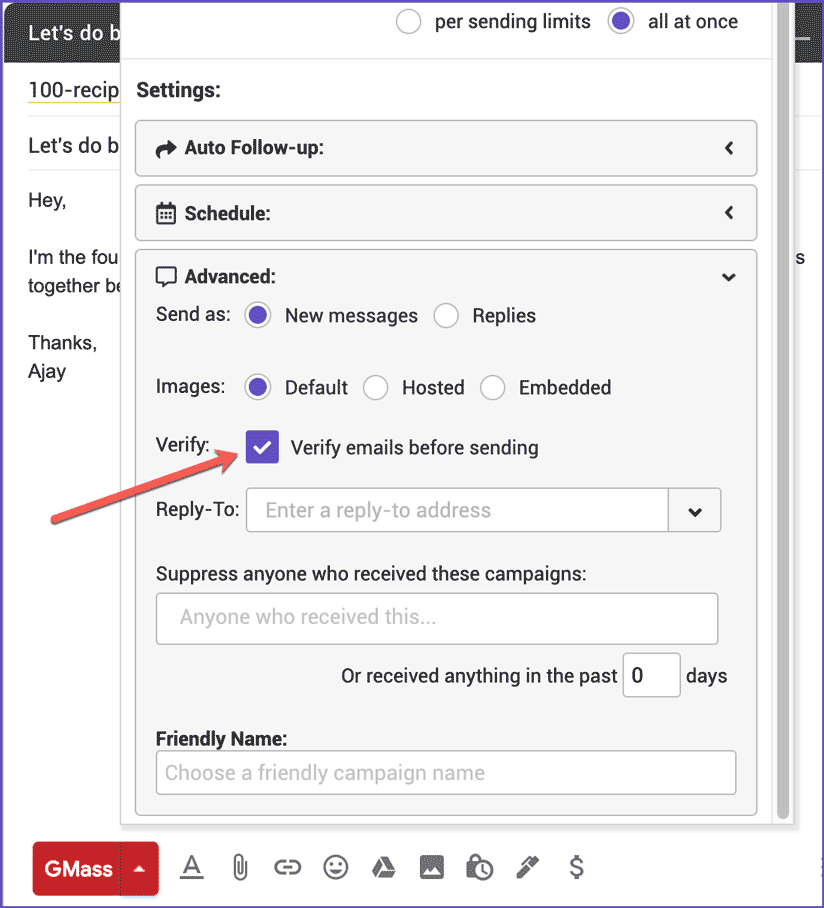
Checking this box will verify each address before a message is sent to that address. The address must NOT FAIL verification for GMass to send your email to it. This is different than requiring an address to PASS verification. By sending to all addresses that don’t fail verification, the verifier is erring on the side of caution to ensure that as many of your emails get sent. Otherwise, if the verifier required verification to PASS, there’s the risk of reducing the reach of your campaign because of false negatives.
If the address fails verification, GMass will skip sending to it, add it to your account’s Bounce list and will log it for your reports. Having verification ON substantially reduces the bounce-backs you get after your mailing since GMass is sending only to valid addresses. What counts as a verification fail? One of the conditions must be true for an address to fail verification:
- The address is malformed. For example, ajay@gmail is not a valid email address.
- There is no registered MX server for the domain, meaning the domain can’t receive email.
- The response from the mail server definitely indicates that the email address is invalid. For example, “User not found” is a definitive message from the mail server indicating that the address is bad.
Therefore, one of the above conditions must be met for GMass to skip sending to that address and add it to your bounce list.
If the mail server responds with a message indicating the mailbox is full, GMass will skip sending to it, but will not add the address to your Bounce list, since the address is still valid and the user might empty the mailbox at some point, therefore making it able to receive your future messages.
If any other condition is met, then GMass considers it a verification PASS and will send your message to that address.
Option 2: Web-based email verifier
You can also verify your addresses separately, outside of the sending process, using our free web-based email extractor and verifier. Just paste your addresses in any format and hit the Extract button, and then after the addresses are extracted, you can hit the next button to VERIFY them.
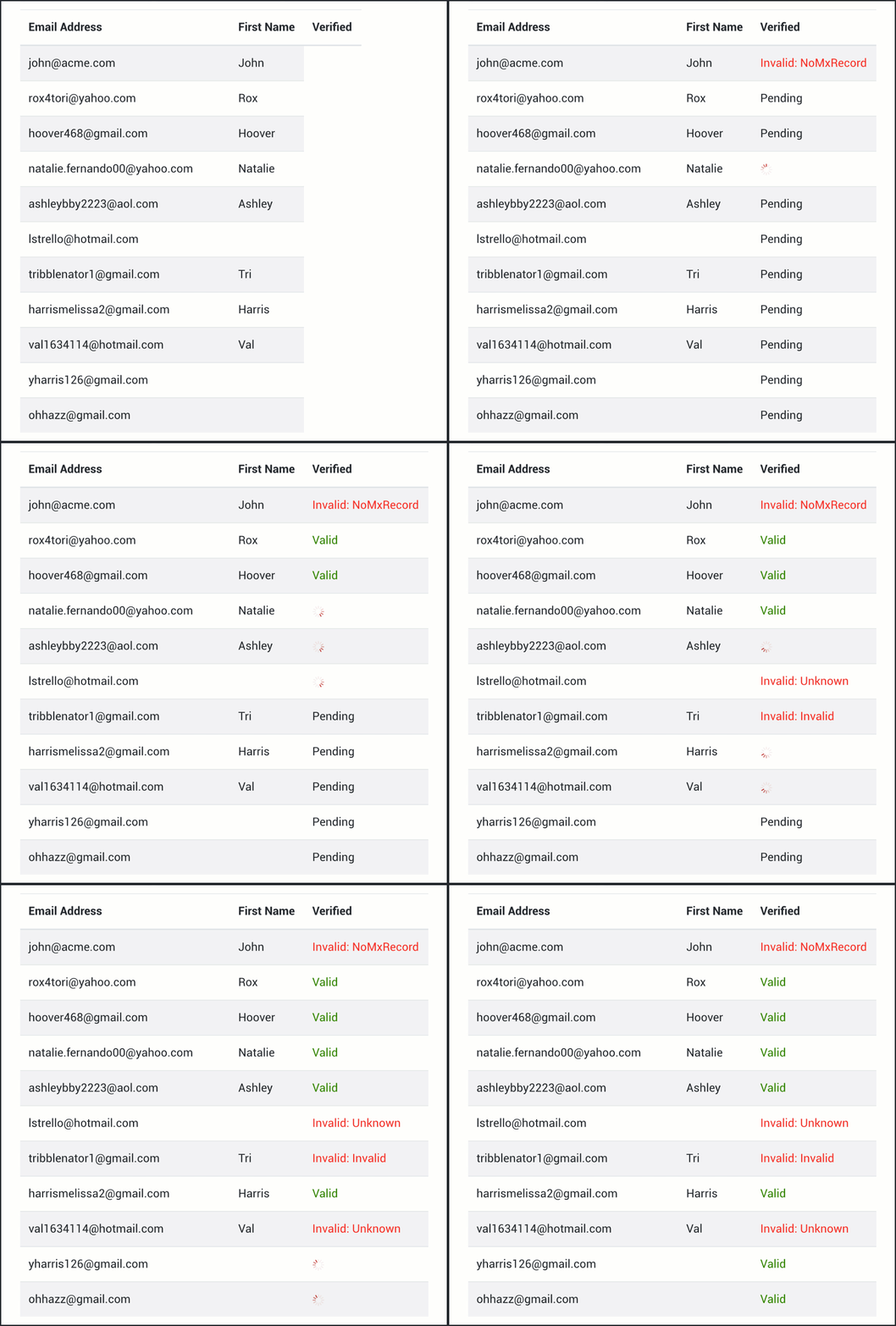
This tool currently has a limit of verifying 5,000 addresses per hour.
The verifier tests each address and lists the verification status as one of the following:
- Valid
- Invalid
- Blocked
- Mailbox Full
- Unknown
- NoMxRecord
- ConnectionFail
After the verifier is finished processing your email list, you can click one of the gray “Copy list” buttons to copy the email list either into a Gmail Compose window, a spreadsheet, a text file, or anywhere you like. If you check the “Include only addresses I should send to” box, then only the addresses that are eligible to receive mail will be copied to your clipboard.
This includes addresses where the status is Valid, Blocked, or Unknown. It might seem counterintuitive that we include in your final send list an address that is BLOCKING email from us, but an address that is BLOCKING email from us is an indication that the address is good. Also, the address might be blocking email from our email verification server, which is hosted at Amazon Web Services (AWS), but that doesn’t mean that it will block email sent from your Gmail account or a third party system like SendGrid. That is why if the verifier detects a block, GMass will still attempt to send your email to that address.
Finally, an email address of “unknown” verification status is one that can’t be confirmed as good or bad, so we recommend sending to it to maximize your outreach potential through whatever email sending service you’re using, whether that’s GMass or something else.
Option 3: API
To use the API just make an HTTP POST or GET to https://verify.gmass.co/verify and add the email parameter and the key parameter, as shown below. A “key” is an API key that you must create inside your GMass account.
Here’s an example using a valid email address.
https://verify.gmass.co/verify?email=ajay@wordzen.com&key=52D5D6DD-CD2B-4E5A-A76A-1667AEA3A6FC
JSON result:
{"Success": true,"Email":"ajay@wordzen.com","Valid":true,"Status":"Valid","StatusCode":250,"Transaction":"Connected to smtp://aspmx.l.google.com.:25/\r\nS: 220 mx.google.com ESMTP d12si3199843plr.335 - gsmtp\r\nC: EHLO ec2-34-221-150-107.us-west-2.compute.amazonaws.com\r\nS: 250-mx.google.com at your service, [34.221.150.107]\r\nS: 250-SIZE 157286400\r\nS: 250-8BITMIME\r\nS: 250-STARTTLS\r\nS: 250-ENHANCEDSTATUSCODES\r\nS: 250-PIPELINING\r\nS: 250-CHUNKING\r\nS: 250 SMTPUTF8\r\nC: MAIL FROM: \u003cbouncetest@bounce.gmass.co\u003e\r\nS: 250 2.1.0 OK d12si3199843plr.335 - gsmtp\r\nC: RCPT TO: \u003cajay@wordzen.com\u003e\r\nS: 250 2.1.5 OK d12si3199843plr.335 - gsmtp\r\nC: QUIT\r\nS: 221 2.0.0 closing connection d12si3199843plr.335 - gsmtp\r\n"}
Here’s an example using an invalid email address.
https://verify.gmass.co/verify?email=badaddress@wordzen.com&key=52D5D6DD-CD2B-4E5A-A76A-1667AEA3A6FC
JSON result:
{"Success": true,"Email":"badaddress@wordzen.com","Valid":false,"Status":"Invalid","StatusCode":550,"Transaction":"Connected to smtp://aspmx.l.google.com.:25/\r\nS: 220 mx.google.com ESMTP 2si3423625pgf.459 - gsmtp\r\nC: EHLO ec2-34-221-150-107.us-west-2.compute.amazonaws.com\r\nS: 250-mx.google.com at your service, [34.221.150.107]\r\nS: 250-SIZE 157286400\r\nS: 250-8BITMIME\r\nS: 250-STARTTLS\r\nS: 250-ENHANCEDSTATUSCODES\r\nS: 250-PIPELINING\r\nS: 250-CHUNKING\r\nS: 250 SMTPUTF8\r\nC: MAIL FROM: \u003cbouncetest@bounce.gmass.co\u003e\r\nS: 250 2.1.0 OK 2si3423625pgf.459 - gsmtp\r\nC: RCPT TO: \u003cbadaddress@wordzen.com\u003e\r\nS: 550-5.1.1 The email account that you tried to reach does not exist. Please try\r\nS: 550-5.1.1 double-checking the recipient\u0027s email address for typos or\r\nS: 550-5.1.1 unnecessary spaces. Learn more at\r\nS: 550 5.1.1 https://support.google.com/mail/?p=NoSuchUser 2si3423625pgf.459 - gsmtp\r\nC: QUIT\r\nS: 221 2.0.0 closing connection 2si3423625pgf.459 - gsmtp\r\n"}
Be sure to create your own API key! The test key shown above has low limits. Also, if you used the API in August 2020, you might have used the verify.gmass.co/check endpoint. That will still work for the time being, but please update your code to use the new verify.gmass.co/verify endpoint.
How to create an API key:
Log in to the GMass dashboard at gmass.co/dashboard. Then click Settings in the upper-right, and then click API Keys on the left.

Here’s a direct link to the API Keys setting.
How to interpret the JSON result:
It’s imperative that you first examine the “Success” value. If it’s false, then look at the “Transaction” value for a reason for the error. The other parameters, like “Valid” and “StatusCode” will indicate a false success, in order to prevent systems from treating email addresses as invalid when they shouldn’t.
If “Success” is true, then next you can look at “Valid” which is a simple true/false as to whether we determined the address is good or bad.
Valid is a boolean true or false and that tells you whether we can confirm for sure that the email is good or bad. However, there are some cases where “Valid” will be false but you should still send an email to the address. A more detailed version of “Valid” is “Status”.
The possible values for Status are:
- Unknown
- Malformed
- NoMxRecord
- Invalid
- Valid
- ConnectionFail
- Blocked
- OverQuota
So “Valid” is ONLY true IF “Status” is also “Valid”.
If you’re validating addresses to decide which ones to send your campaign to and which ones to skip, you should consider still sending to email addresses where the “Status” is “Unknown” or “Blocked”. “Unknown” means we just couldn’t be sure based on the SMTP response, and “Blocked” means that our verification service was blocked, but that doesn’t mean that YOU will be blocked when you send an email.
Usage Limits
The following limits apply when using the verification service.
- When verifying while sending a GMass campaign with the “Verify” checkbox: No limits
- The web-based verifier: 5,000 verifications per hour
- The API: 5,000 verifications per user per hour
Updating a Google Sheet with email verification data
This option is only available if you’re using the email verification service as part of a GMass campaign.
If you have your email addresses in a Google Sheet, GMass can update your Sheet by adding a VERIFIED column and marking each address with a PASS or FAIL based on whether the address passes verification.
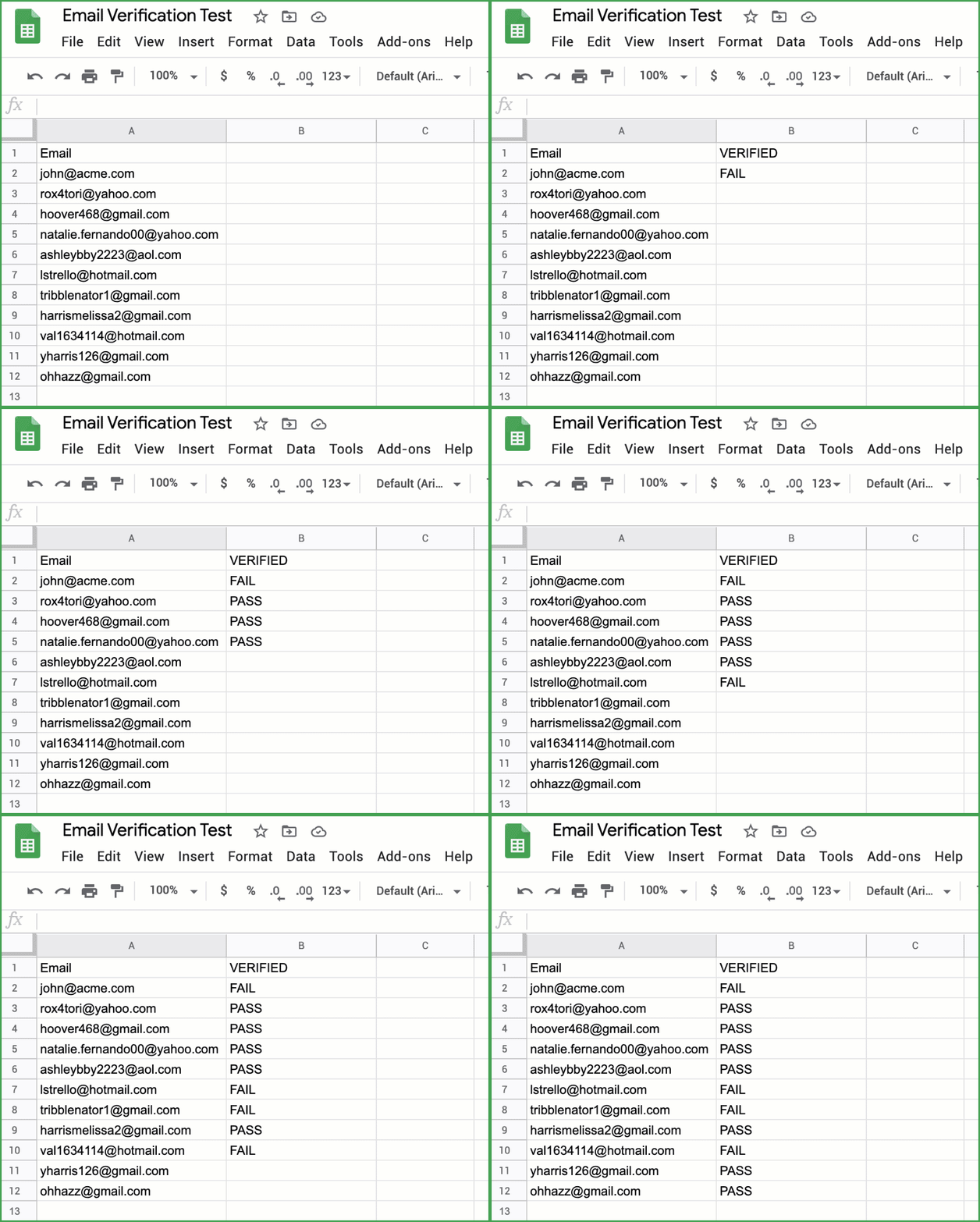
To run a Google Sheet of email addresses through verification:
- Set up your Google Sheet so that it is formatted properly, with column headings across the top.
- Use GMass to connect to the Sheet by clicking the Sheets icon, choosing the Sheet, and letting the Gmail Compose window launch. More information here.
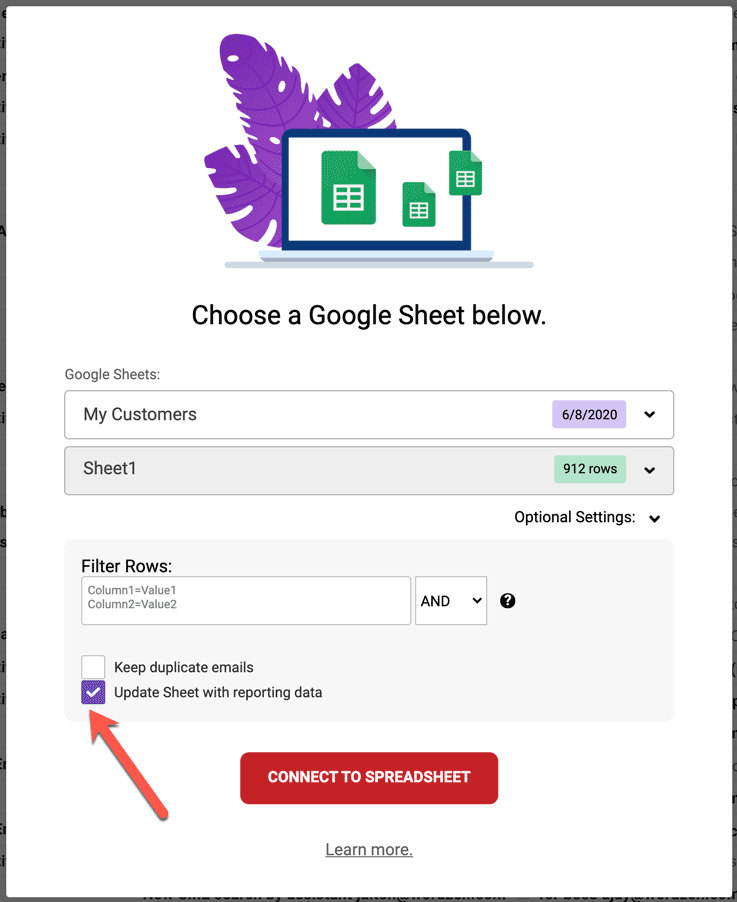
- If you want to send an actual campaign to your list, then you can proceed just like you’re sending, but make sure to mark two boxes: a) The Update Sheet with reporting data box and b) the Verify box. The “Update Sheet with reporting data” checkbox is an option in the popup that launches where you specify your spreadsheet and worksheet. More information here.


- If you don’t want to send an actual campaign but just want GMass to update your Sheet with verification results, then type any Subject/Message and set “Just create DRAFTS” in the Settings box. This will allow GMass to process your Sheet and verify all of your email addresses without sending any actual emails. When you’re ready, hit the main GMass button. A bunch of DRAFTs will get created, but you can delete them later with the link that GMass sends you. More information here.
Frequently Asked Questions (FAQ)
Is it really free?
Anyone can use our web-based email extractor and verifier for free. You can verify up to 5,000 addresses per hour using this tool.
If you want to verify email more than 50 addresses inside Gmail using our Chrome extension, you’ll need a GMass subscription to do so. Since GMass only lets you process 50 emails per 24 hours on the free plan, if you want to verify more than 50 addresses in a Google Sheet, then sign up for any subscription plan, even the Minimal one, so that you can process more than 50 emails or DRAFTs per day.
Is there an API for the email verification service?
Yes, see above!
Will verifying email addresses improve my deliverability?
It’s generally accepted that the lower the bounce rate you have, the better your email deliverability will be. Why? Because if an email provider is seeing that you’re sending to a lot of invalid addresses on its server, it’s more likely to think you’re doing something sinister than if you’re sending only to valid addresses. By having your addresses verified prior to sending, you’re minimizing the number of invalid-address emails you even attempt to send.
What are the downsides to using verification while sending with GMass?
There are two downsides to using verification:
1) It slows down your sending, because each email address is verified immediately before sending. If you’re sending a cold email campaign to 100 people, each address is verified, and then if it doesn’t fail verification, the email is sent. In many cases this will be acceptable since cold emailers often like to space apart their individual emails anyway.
2)There’s a chance that our verifier might determine the address is invalid even when it’s actually valid, and that could reduce the number of people to whom your message is sent. This will be rare, but as explained in the question below about the difficulty in building a verification service, our service is not 100% accurate because of the variation in SMTP response codes.
Was it hard to build a service to verify emails?
It wasn’t easy. Compared to all the email tools we’ve built, this had a medium level of difficulty. That part that makes it difficult is analyzing all the possible SMTP bounce codes to determine what definitely means that an email address is invalid versus only possibly invalid. For example, a standard SMTP response code of 550 usually indicates that the email account doesn’t exist on the server. But some mail servers also respond with a 550 when they’re blocking your transaction because of a Spamhaus listing, for example.
We’ve also seen some cases where a mail server, in this case the server for rediffmail.com, a popular Indian email service, responds with:
550 A message that you sent could not be delivered to one or more of its recipients. This is a permanent error.
Only to respond with this a few hours later:
250 ok
In another case, we saw Mimecast respond with:
550 Invalid Recipient - https://community.mimecast.com/docs/DOC-1369#550 [krAti5jIOQW6F_z5KnAVbw.us456]
and then a few hours later, for the same address, it responded with:
250 Recipient OK [sLEl3_fPPVKzaLLYGZ-DyQ.us472]
These varying responses and the non-standardized use of numerical SMTP response codes is what makes this a somewhat difficult problem to solve. It’s also the reason why email verification is a whole industry on its own, separate from email sending tools. We, however, like to take on the challenge of building tools better than what the industry already offers. 🙂
How does the GMass email verifier compare to other services?
We think that our verifier is pretty good, but it’s likely not the most accurate in the industry. GMass is a company whose primary business is its Chrome extension and the verifier is a feature. We verify email addresses using solely SMTP. There are other companies whose primary service offering is email verification and they validate addresses using SMTP plus other methods. That said, if you want a pretty good service that will meet most people’s needs, then our verifier will pass muster. If, however, you need the most accurate email verification service possible, or you need to verify millions of email addresses, then we recommend a service that focuses 100% on email verification. Here are some options:
Bouncer: I’ve never used the service but I’ve recently befriended its CEO, Radek Kaczynski.
NeverBounce: Again, I’ve never used it, but I’ve become acquaintances with its founder.
Kickbox: Never used it, but I’m in a private email service provider group with the founders, and their service must be decent because they were acquired recently by J2.
Email marketing, cold email, and mail merge all in one tool — that works inside Gmail
TRY GMASS FOR FREE
Download Chrome extension - 30 second install!
No credit card required

Ajay is the founder of GMass and has been developing email sending software for 20 years.