Globally Shared Unsubscribes and Bounces Across Domains and Teams

If you send an email that bounces or have someone unsubscribe, you (almost certainly) don’t want other people on your team continuing to send them messages.
That’s when GMass’s globally shared unsubscribes and bounces come into play.
When you turn on global unsubscribes and/or global bounces in your account, GMass won’t send emails (aka GMass will “suppress” emails) to addresses that have unsubscribed/bounced from other people at the same email sending domain and on your Team plan.
The best way to illustrate this is with an example…
How Global Unsubscribes and Global Bounces Work in GMass
Let’s say your organization has the following five users:
ben@company.com
joe@company.com
sarah@company.com
kim@company.com
matt@company.com
All five are using GMass, and some members of the company might be emailing the same people. Let’s say ben@company.com and joe@company.com both send emails to leads and therefore sometimes send to recipients in common with each other.
Normally, if a recipient unsubscribes from ben@company.com’s emailings, the recipient could still potentially receive emails from joe@company.com.
But with the Global Unsubscribe feature, the recipient would not receive emails from joe@company.com. As long as joe@company.com turns on “Use Global Unsubscribes” for his account, GMass will suppress emails he sends to addresses that are on ben@company.com’s list — or the unsubscribe lists of everyone else in the organization.
Similarly, you may also want to use Global Bounce suppression. If a particular email address bounces for ben@company.com, then it benefits joe@company.com from an email deliverability perspective to avoid sending to the same invalid email address. Normally, an attempt by joe@company.com to send to that address would result in a send and then a bounce. With Global Bounces, the attempted send to that address by joe@company.com would be suppressed by GMass.
This also works for anyone on a GMass for Teams plan. You can have users on your team with different email address domains.(e.g., you could have some people @company.com and some people @differentcompany.com and other people @gmail.com.) GMass will check the unsubscribe and bounce lists for everyone on your team.
One more example. Let’s say kim@company.com does NOT have global unsubscribes turned on. That means when she sends a campaign, GMass will only check her unsubscribe list — not the unsubscribe lists of Ben, Joe, or anyone else in the company.
But… since Ben and Joe both have global unsubscribes turned on, when they send campaigns, GMass will still check for them against Kim’s list.
Who GMass filters out when you have global unsubscribes and/or global bounces turned on
When you have global unsubscribes and/or bounces turned on, here’s who GMass will automatically filter out of your campaign. (So even if you try to send an email, GMass will suppress it and not send it.)
- Your account’s own unsubscribe and bounce list.
- The unsubscribe and bounce lists from anyone on the same email domain, even if they have global unsubscribes/bounces turned off for their own account.
- The unsubscribe and bounce lists from anyone on your Team plan, even if they have global unsubscribes/bounces turned off for their own account.
It’s up to each individual person in the organization and/or on the team if they want to use global unsubscribes and global bounces on their own account.
How this works for free Gmail.com accounts
Global unsubscribes/bounces work a bit different if you’re using a free @gmail.com or @googlemail.com address.
When you turn on global unsubscribes/bounces as a free Gmail user, you won’t share unsubscribe/bounce lists with everyone on the domain — because that’s every single person with a free @gmail account.
However, people with free Gmail accounts who are on a Team plan will have campaigns suppressed against their teammates’ unsubscribe/bounce lists.
How this works for GMass MultiSend accounts
If you’re using GMass MultiSend for inbox rotation, you can use global unsubscribes across all your sending accounts.
If you have global unsubscribes turned on in your main account, GMass will suppress emails to anyone on that list from all your connected sending accounts (and will also suppress emails to anyone on those accounts’ unsubscribe lists).
GMass will also suppress any emails to unsubscribed domains from all sending accounts. (See more details and an example here.)
Turning Global Unsubscribes and/or Global Bounces On or Off in the GMass Dashboard
To enable Global Unsubscribes, Global Bounces, or both, just head to your GMass dashboard.
Both features are in the settings, and you can turn each feature on (or off) with the checkbox.
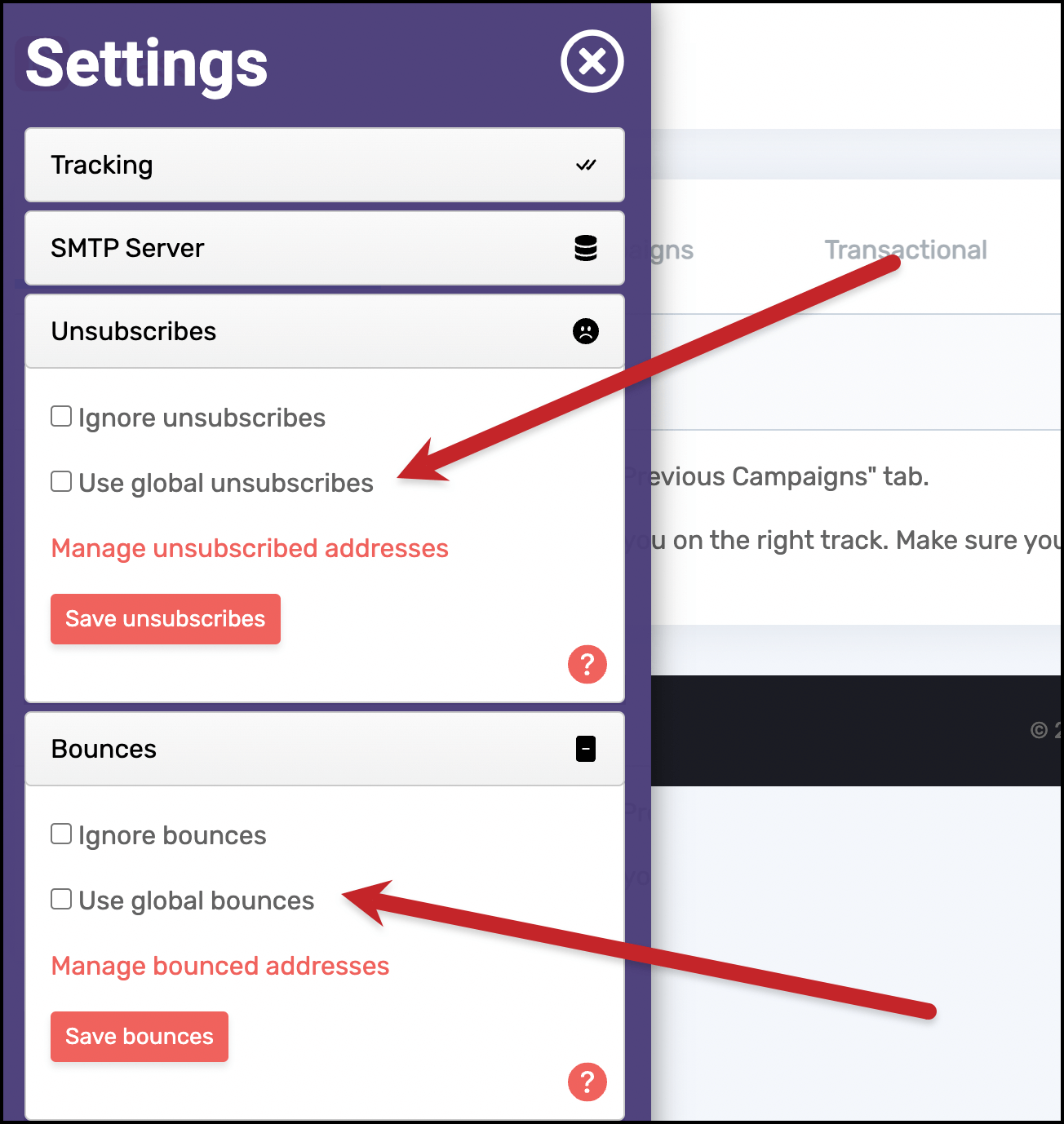
You can also remove addresses manually from your unsubscribe or bounce lists by clicking on their respective Manage links in the GMass dashboard.
Only GMass packs every email app into one tool — and brings it all into Gmail for you. Better emails. Tons of power. Easy to use.
TRY GMASS FOR FREE
Download Chrome extension - 30 second install!
No credit card required

Ajay is the founder of GMass and has been developing email sending software for 20 years.