
You can now A/B test your email outreach campaign using our powerful platform. Here are the basics:
- Easily vary your Subject/Message with different sets of content.
- Get separate open/click/reply statistics on each variation that’s sent.
- Send to a portion of your list, and then decide which variation is the best, and then send the “winner” the rest of your list.
- The “winner” can be chosen automatically by our algorithm or by you.
Just curious about using spintax to vary up your emails, with or without A/B testing involved? Jump to the spintax section of this article.
A demo
A simple A/B test
To conduct an A/B test on a campaign, there are two steps to take:
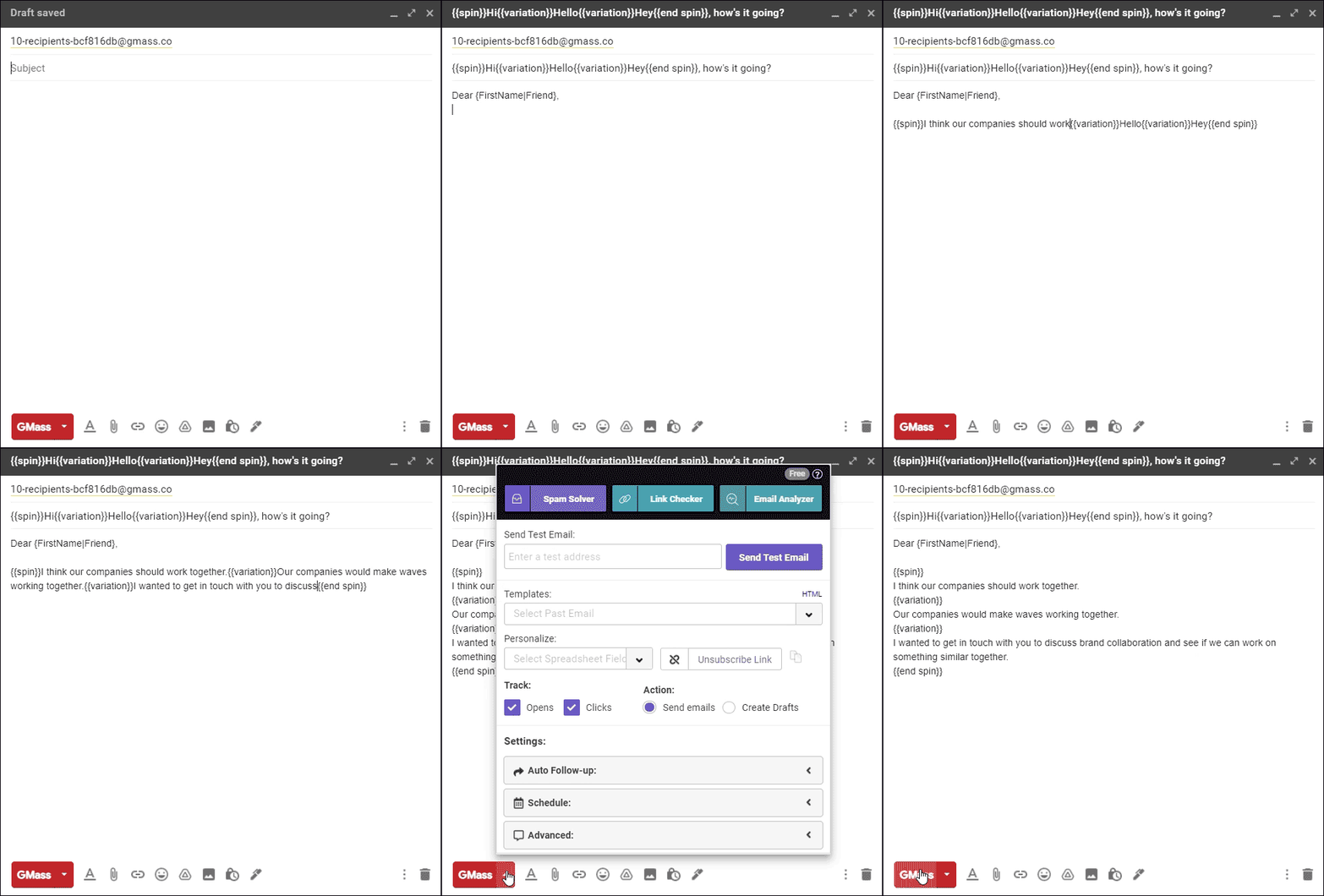
- Create a variation using our “spin” syntax (aka spintax) in the subject or the message. Here’s an example:

- Apply the A/B settings in the settings panel. Here’s an example:

In the above simple example, the subject line will be varied as the email begins to send. If I send to a list of 100, only 30 emails will be sent at first, with approximately 10 emails with the subject line “Hi”, 10 emails with the subject of “Hello”, and 10 with “Hey”. Four hours after the 30 emails are sent, a winner will be chosen automatically based on the open rate of all three segments. At that time, the remaining 70 emails will send with the winning subject line. Technically, this is an A/B/C test, since there are three variations.
A more sophisticated test
In a real life scenario, you’ll want to do more than just vary the subject line between Hi, Hello, and Hey. If you’re sending cold email, you may want to vary your introductory line. Here’s a more practical scenario:

Here, three different introductory lines will be used, and if I’m a cold emailer, I’m likely to care about the “reply” rate more than anything else. Because it can take a while for people to reply, I want to wait 24 hours before picking a winner, so my A/B test settings would look like this:

Using A/B testing on a complete cold email sequence
You can A/B test your initial message plus each message in your email sequence. Here’s how that might look in the Settings box.

Note that you don’t have to have the same number of variations in your follow-up template as you do in the original message. Each follow-up template can have a different number of variations in the message, but of course, this will make it more difficult to assess which version is really having the most impact.
Using the “manual” option
If I choose the “manual” option, I’ll be notified in my dashboard and via email when it’s time to pick a winner.
After the initial batch of emails are sent, and after the specified number of hours have passed, you’ll get an email that looks like this:

You’ll also be alerted in your dashboard that it’s time to pick a winner.
You can then choose the winner from either the email notification or your dashboard, and then the remaining emails will be sent.
Personalizing inside the variations
You can use our standard personalization syntax inside the variation blocks. Using our Hi/Hey/Hello example, you can also do this:
{{spin}}Hi {FirstName}{{variation}}Hello {FirstName}{{variation}}Hey {FirstName}{{end spin}}
In fact, inside each variation you can use our full personalization syntax and our full conditional content scripting language.
Interested in statistics only?
You might want to conduct an A/B test but not have any decisions made, manually or automatically. Meaning, you might want to send to 100% of your list while varying your content. To do so, just set the slider in the A/B settings to 100%.

If you set the A/B settings to send to 100% of recipients, then:
- All emails will go out at once, with an equal number of recipients receiving each variation
- No decision will need to be made, automatically or manually
- You can still see how each variation performs in your campaign report
Coming from a different A/B testing platform?
If you’re migrating from another email platform offering A/B testing, our way of doing things might be different and take some getting used to. Traditional email marketing platforms have you create an entirely different subject/message as your “B” version, while in GMass, you put in all the variations within one single message using our special spintax commands. We’ve always focused on efficient workflows, and we think our way is a faster, easier way to launch an A/B test.
In most A/B tests, some content of the message is similar between the variations, and with our way, you don’t have to duplicate the common content across message spaces.
Understanding line spacing when composing variations
When you put in a variation into the Message area, you’re using our conditional logic spin feature, consisting of these tags:
{{spin}}

{{variation}}

{{end spin}}
A line that has just a conditional logic code on it does not count as a line of space when our processor interprets your campaign.
So both of the following examples will produce the exact same line spacing:
{{spin}}
Hi there,
{{variation}}
Hello!
{{end spin}}

How are you doing?
and…
{{spin}}Hi there,{{variation}}Hello!{{end spin}}
How are you doing?
How to test your A/B variations
Before you conduct an A/B test campaign, you probably want to see what each variation of your full complete message will look like to the receiver.
The easiest way to test your variations is to use the “Send Test Email” button at the top of the settings box. When you send a test email to yourself, each possible variation of the email will be sent. For example, if my subject line looks like:
{{spin}}Hi{{variation}}Hello{{variation}}Hey{{end spin}} there!
Then when I send a test email, three test emails will be sent, each one showing the different subject line.
Additionally, you can also use the A/B feature along with the “Create Drafts” setting. By doing so, you can review the DRAFTs that are generated for each of your email addresses before sending. You can also then modify the contents of individual DRAFTs should that suit you. However, note that the “timer” for when the testing period expires starts after the DRAFTs are created, so make sure to get them sent relatively soon after they’re generated.
FAQ
After the initial test is sent, can I change my mind and send more as part of the test?
Yes! Just adjust the percentage slider up, and save your campaign. More emails will then be sent as part of the test.
What happens if I use the “spin” syntax (spintax) but don’t put in any A/B settings?
Then the email will still vary itself across the whole list, but a winner will never be chosen. Your entire list will be split amongst the variations.
What happens if I put in the A/B settings but don’t include any spintax in my Subject/Message?
You’ll get an error and won’t be able to launch your campaign, since you can’t conduct an A/B test without at least one variation.
Do the number of variations throughout the Subject and Message have to be equal?
Yes. For example, you cannot have 3 variations of your introductory text, and then just 2 variations of your second paragraph. That would produce inconsistent and confusing results, so we don’t allow it.
Spintax in GMass
A/B testing in GMass makes use of spintax. That is: The syntax you can use to send different variations of a word, sentence, paragraph, or other email element to different recipients.
And while the “traditional” use of spintax is for A/B testing, you can also use spintax if you just want to vary up your email copy — no testing involved. (Some cold emailers like this strategy, as they like as much variation as possible in the mass emails they send.)
In 2025, GMass added SpinMax — an AI-powered spintax engine that automatically makes every single message in your campaign slightly different.
However, you can also use spintax the manual way if you’re like.
As we’ve covered throughout this article, you can add spintax to a campaign in GMass by employing the three spintax tags: {{spin}}, {{variation}}, and {{end spin}}.
Spintax in an email message with GMass
For example, I could send an email where I’m spinning the way I introduce myself.
{{spin}}
My name is Ajay, and I live in Ohio.
{{variation}}
I’m Ajay, and I live in the Midwest.
{{end spin}}
I can send a test to myself — GMass automatically sends a test with each spintax option — to see the results. When I send the campaign, half of my list will receive one version, half will receive the other. (If I’m running an A/B test, it could be a different percentage. For example, if I want to test on 40% of my list before sending the winner, 20% will get one variation, 20% will get the other, then the remaining 60% will only get the better-performing version.)

Spintax in the subject line with GMass
You can also use spintax in subject lines, with or without an A/B test.
For example: {{spin}}Want to make $1 million?{{variation}}Want to make $1 billion?{{variation}}Want to make $5?{{end spin}}
My emails would now go out with one-third of my list getting each of the variations.

Using spintax in multiple spots with GMass
You can also use spintax multiple times in an email. GMass won’t send out every possible permutation. It will send all of the first spin options together as one message, all of the second options together as one message, and so on. That’s why your different spintax sections all need to have the same amount of variants.
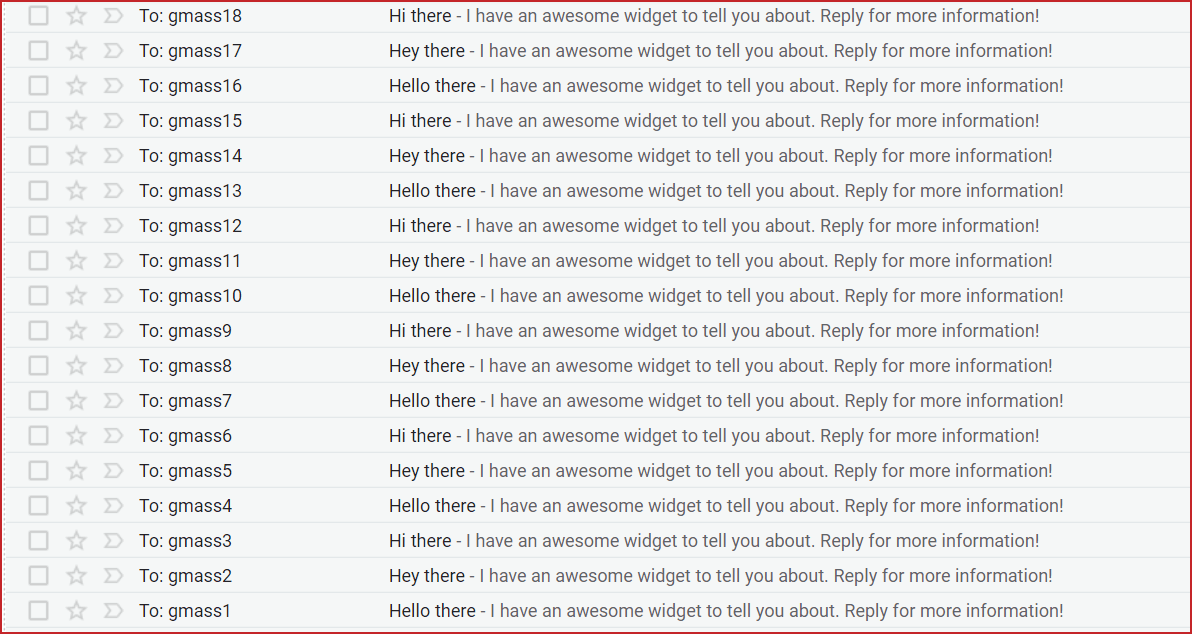
Here’s an email where I’ve used spintax in the subject line and twice in the email message.

And here are the results.

So, again, you can use spintax for your A/B testing or in the emails you’re not A/B testing if you want variety. It’s as simple as using the three spintax tags and typing in your variations.
Email marketing. Cold email. Mail merge. Avoid the spam folder. Easy to learn and use. All inside Gmail.
TRY GMASS FOR FREE
Download Chrome extension - 30 second install!
No credit card required

Ajay is the founder of GMass and has been developing email sending software for 20 years.