
Starting today, the open tracking pixel we insert into your emails to track opens will look different. They will now be non-parameterized, encrypted URLs that are very, very difficult for pixel-blockers to detect.
Examples of pixel tracking in emails
Ever since email marketers invented a way to track whether someone opens an email, counter measures have been trying to block the ability to tell whether an email has been opened. Open tracking works by inserting an image tag into the email, where the image URL is unique to each recipient. If that particular image is downloaded by the email client, then the marketer knows that that particular recipient opened the email. It’s a trick email marketers and cold emailers have used ever since emails were allowed to contain HTML.
Typically a GMass tracking pixel looks like this:
<img height="0" width="0" src="http://ec2-52-26-194-35.us-west-2.compute.amazonaws.com/x/o?u=3D4836e6cc-0b4a-4d4b-8e75-39c04d139bf9&c=2724793">
Starting today, it will be non-parameterized and encrypted:
<img src="http://ec2-52-26-194-35.us-west-2.compute.amazonaws.com/OzqNT9U_4GWwWja0p6FyDFL3s1yl2LXMbKhKWmqIY3m2ZMlRqjIZtarzGOem8WXU6CiTUZUZLR6-f9QkENOu2cPbVfEdju_SSCo4x9Czk-rDQmi81_KcdchyrL6jFDCyhvcEop7GRYuvnD6DwSaFVwnEPNvGQVsPQp3hREWpqFuFZToXZWr">
If you look at other tracking pixels from popular email marketing services, they follow a similar format.
Tracking pixel from MailChimp:
<img src="https://thinkific.us20.list-manage.com/track/open.php?u=9ce134924e20d07b0555e3ef3&id=7bad33ad13&e=c6fc19945a" height="1" width="1">
MailChimp uses a standard pixel, with specified 1×1 dimensions and an image URL with three query parameters.
Tracking pixel from Constant Contact:
<img src="http://r20.rs6.net/on.jsp?ca=27edb7ff-a1da-440b-8e7c-e801ae93ae85&a=1123722063060&c=f76c377e-c2ba-11e9-8d07-d4ae52754007&ch=f76d3bec-c2ba-11e9-8d07-d4ae52754007" / alt="">
Constant Contact uses a standard pixel, without setting the height and width but with an image URL with several query parameters.
Tracking pixel from Twilio SendGrid:
<img src="https://u123847.ct.sendgrid.net/wf/open?upn=g0kn1nykOryF9fxxV-2BnyY4uXbKybbHq99YMco1LcmREUCWI6Peodkhk0W3kLkWZ9-2FRrgnOUd54RsBRa-2FNPrU081NM-2BK1BIHCBdb6CJNkvKemAAP3Rpjvz6ax5hdIc41G0isabMxwKW2YHfEjbqUW5Am6Uot2OsjUqBZ4DRBPEEKB6EJ74LiENRINjUi0vFHemTrDvS-2BAJmAKpYuOm2XiZOgbPhfMv-2FUrKZjAVDIMoT4-3D" alt="" width="1" height="1" border="0" style="height:1px !important;width:1px !important;border-width:0 !important;margin-top:0 !important;margin-bottom:0 !important;margin-right:0 !important;margin-left:0 !important;padding-top:0 !important;padding-bottom:0 !important;padding-right:0 !important;padding-left:0 !important;"/>
Twilio SendGrid gets the award for the longest tracking pixel URL and the most inline CSS, but they are a tad smarter than the rest, by encrypting the main parameter in the image URL. Still though, they are setting a height and width and using a query string parameter.
Tracking pixel from Customer.io:
<img src="http://email.domain.com/e/o/eyJlbWFpbF9pZCI6IlJOMjRCUU1BQVhNMFM5UjdzLXI3c1Z2RUdsVW1WQT09In0" style="height: 1px !important; max-height: 1px !important; max-width: 1px !important; width: 1px !important"/>
Customer.io is the smartest of the bunch, using a non-parameterized image URL and without setting the traditional height/width attributes in the image tag. This is very similar to what GMass is now doing, except for one key difference. The length of the Customer.io image URL will always be the same, and this makes it easy for a pixel blocker to identify it.
How pixel blockers work
Given the above examples of the image tag that tracks opens, you might be able to determine how a pixel blocker works. There are several attributes of an open tracking pixel that separate it from a “normal” image in an email, and if a pixel blocker can identify those attributes, it’s easy to block just the tracking images. Of course, a pixel blocker has to be careful to block only the tracking image and not the other images, because if the other images are blocked, and this upsets the user, the user will want to uninstall the pixel blocker.
What are those common attributes?
- Dimensions of 1×1 or 0x0
- An <img> src value with query parameters
- A discernible length for all tracking pixel URLs
A smart pixel blocker can identify all 1×1 or 0x0 pixels from the img “src” attributes and block them, figuring that even if they are part of the email design and not a tracking pixel, the effect on the rendering of the HTML email is likely minimal since a 1×1 pixel is so small, or in the case of a 0x0 pixel, invisible. Blocking all 1×1 pixels is more dangerous because there might also be a legitimate 1×1 pixel that’s part of the design of the HTML email.
Additionally, if the image URL has query parameters, that’s a dead giveaway that it’s likely a tracking pixel. It is exceedingly rare for an image that’s actually part of the email design, and not a tracking pixel, to contain query string parameters.
Lastly, whereas the image URL of “normal” images in an HTML email will vary in length (for example, logo.png is a different length than header-banner.jpg), if an email service provider’s image tracking URL is consistently the same length and always contains the same number of query string parameters, that makes it easily identifiable by a regular expression parser looking to block tracking pixels.
What are some common pixel blocking tools?
Back when I first launched GMass on Product Hunt, there was another product that launched around the same time called Ugly Email that was #1 for the day. It was a Chrome extension that blocked open tracking pixels. It was popular for a while, but it looks like the product has ceased development, as the last update on the Chrome store for Ugly Email is from July 2018.
Other more current pixel blockers include Chrome extensions like PixelBlock and Email Privacy Protector and most recently, a new consumer email service called HEY claims to block the tracking pixels of many email service providers, and they go so far as to publish a list of all the tracking pixels they block.
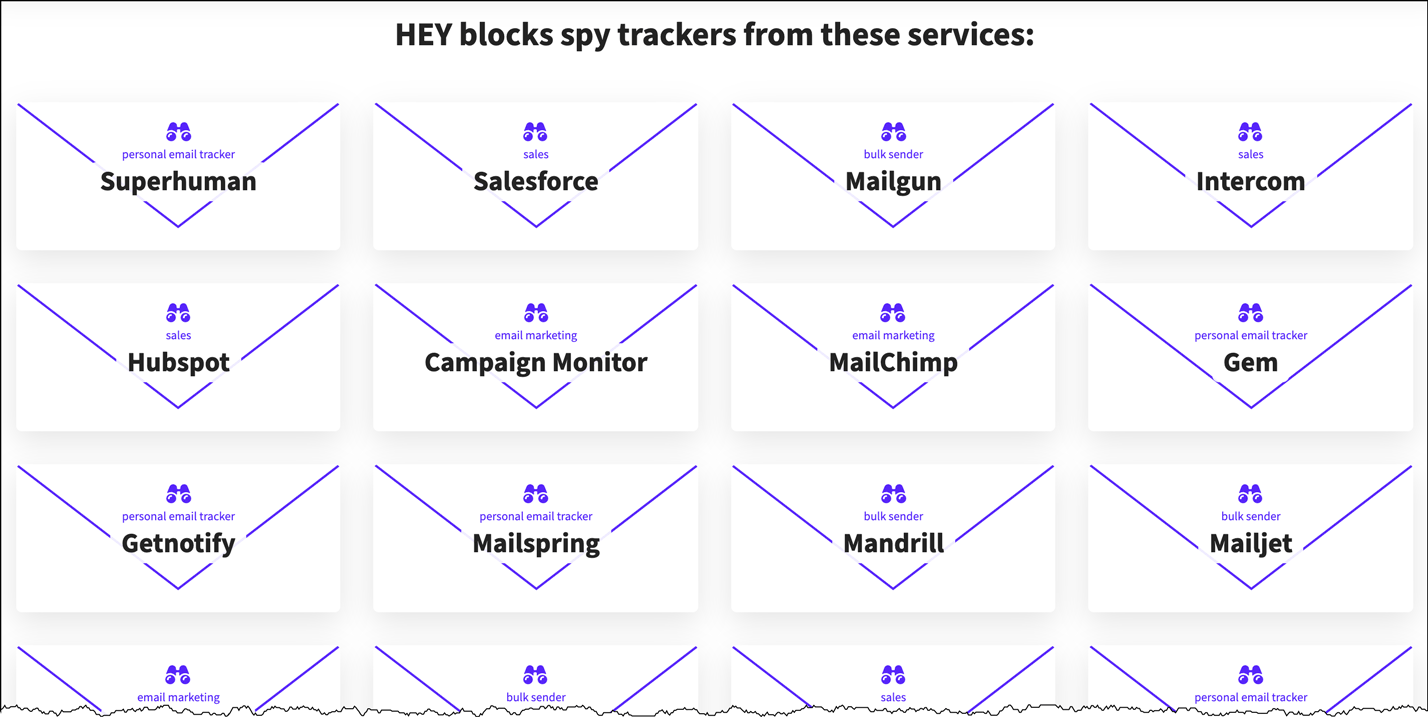
Note that GMass isn’t on the list, likely because we haven’t come across their radar yet. I suspect that we eventually will, and this makes our new open tracking technology even more relevant.
HEY’s competitor is Superhuman, a fancy email client that’s popular among Silicon Valley types. Superhuman landed in hot water because it inserted a tracking pixel in all sent emails by default unless a user turned the feature off. To quell the uprising, they reversed course and had the feature turned OFF by default but still let users turn it on. Additionally, Superhuman blocks tracking pixels in received email by default, via this setting:

But I’ve tested our new encrypted open tracking mechanism, and it does indeed get past Superhuman’s blocker. Here’s a notification from my own Opens folder in Gmail:

Notice the User Agent…Superhuman!
How we’re getting around the pixel blockers
If you study our new format for the open tracking pixel, you’ll notice that it:
Does not set the height and width attributes
This makes it impossible to tell the size of the image before it’s downloaded. And once it’s downloaded, it will register as an open. So blockers can’t use its size to determine whether to block it from the user. The exception would be if a blocker had the infrastructure to download all images in all emails to “fool” the email tracking system, and then only present the non-1×1 and non-0x0 pixels to the email client, but I’ve never heard of this happening.
Does not have query parameters
We have removed the question mark (?) and the query parameters from our image URLs so that they look like “normal” images.
Has a varying length
Every time you send an email campaign with GMass, the open tracking URL will have a different length. That’s because we’re using an AES encryption algorithm that encrypts the parameters into a variable-length string.
Allowing the customer to set a tracking domain
You might notice that the host of the pixel is http://ec2-52-26-194-35.us-west-2.compute.amazonaws.com, which is our AWS server that handles tracking. A pixel blocker could identify this string and block it, but then a lot of other elements of an email would also be blocked. Still, it’s best to set a custom tracking domain like email.yourdomain.com to brand the image URLs and avoid this problem altogether.
I hope that you’ll find this innovative way of handling open tracking a reason to choose GMass over other email sending tools because nobody else has thought this problem through like we have.
More Reading
If you’re interested in learning more about email tracking, I recommend reading these articles:
- This Wired story about how email tracking became so popular
- The Wikipedia article on email tracking.
- The blog post that caused controversy for Superhuman.
Update – July 19, 2020
The company behind HEY discovered this blog post and has now implemented a method to block our new encrypted tracking pixel. Many people have been asking me what my next move is. For now, we’re laying low. We could alter our algorithms to circumvent their blocking again, but I don’t see the point of escalating the matter. The amount of email we we deliver to hey.com is minimal, and if it starts to climb, we’ll re-examine the issue.
Only GMass packs every email app into one tool — and brings it all into Gmail for you. Better emails. Tons of power. Easy to use.
TRY GMASS FOR FREE
Download Chrome extension - 30 second install!
No credit card required

Ajay is the founder of GMass and has been developing email sending software for 20 years.