Mailtrack just did something brilliant

As the developer of two Chrome extensions, GMass and Wordzen, I’m always on the lookout for what other Chrome extension developers are doing. Mailtrack is a popular Chrome extension for Gmail that tracks individually sent emails. GMass tracks sent emails too, but it’s mostly used for batch email campaigns, although you can use GMass’s tracking features on individually sent emails as well. But I digress…in this post, I’ll focus on Mailtrack’s brilliance.
Mailtrack and Chrome extensions
MailTrack is one of the most popular Gmail Chrome extensions on Earth, with nearly 900,000 users, according to the Chrome Web Store. I admit, I’m envious of their growth and would love to see GMass have that many users.
One of the limitations of Chrome extensions has always been that they only work on the desktop, and not on mobile. GMass only works on the desktop, not on mobile. Wordzen only works on the desktop, not on mobile. Same with Mailtrack.
So when I saw their announcement that they could now show you the checkmarks indicating whether an email has been opened in the Gmail mobile app, my immediate reaction was, “No way, impossible!”
I had to see for myself. First, I turned ON the mobile option on the Mailtrack Settings page.

The checkmarks on the iPhone Gmail app
I sent a tracked email using Mailtrack to briansmith8477@gmail.com from my desktop, and then looked at it in the Sent folder on both the desktop and iPhone.
Sure enough, the famous Mailtrack checkmarks were there.
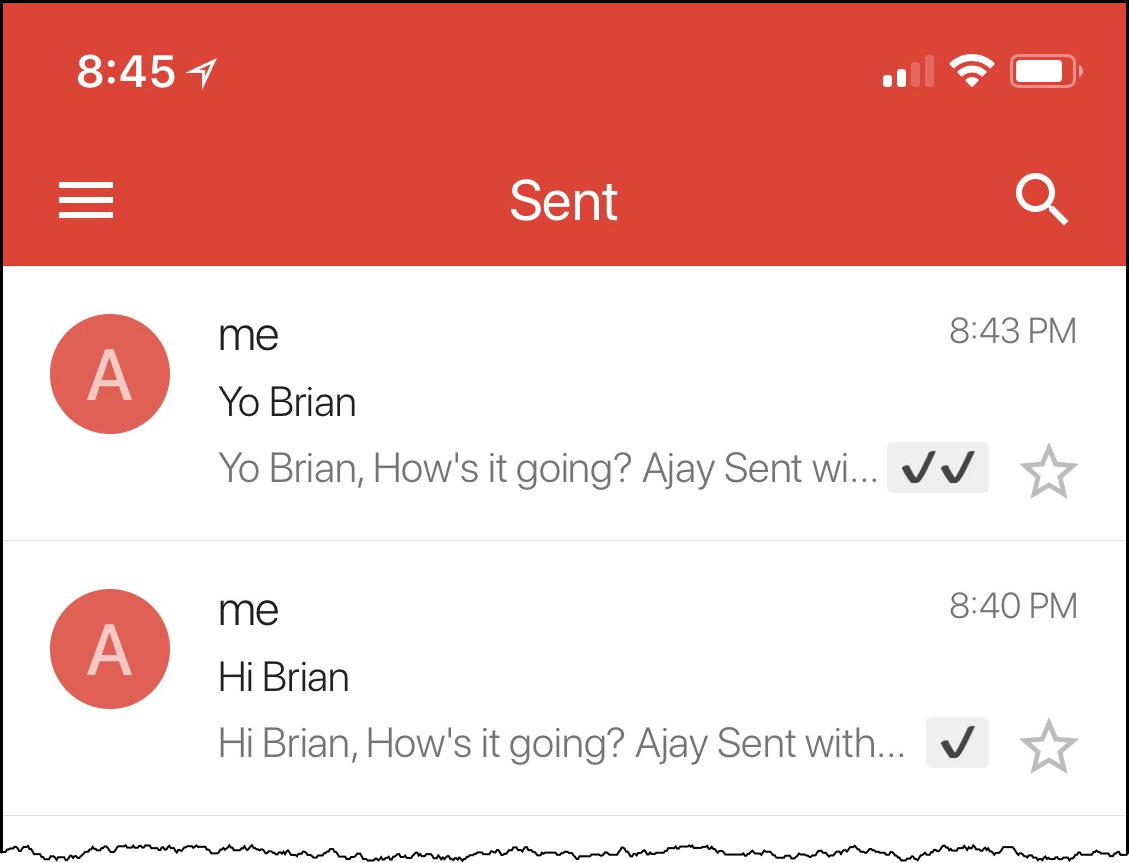
But how on Earth did they do this?
Did they hack the Gmail app? Did they develop a Gmail Add-on, which is a new way of developing functionality for the Gmail mobile app that was introduced just six months ago? Maybe, but that sill wouldn’t make sense because Gmail Add-ons currently only work on Android, not on iOS.
A closer look, and I discovered the brilliance of the Mailtrack developers.
The answer? Labels.
They creatively apply Gmail Labels to show whether an email has been opened. Looking at my account, I found two new Labels had been created, the first with one checkmark and another with two checkmarks.

When an email is sent, Mailtrack programatically applies the ✔ Label. When an email is opened by its recipient, Mailtrack removes the ✔ Label and applies the ✔✔ Label. Since the mobile Gmail app always shows the Labels that are applied to a message, you see checkmarks next to the message! Just brilliant.
But wait, if they’re applying these Labels now, won’t they also show up in the desktop UI?
No, they made it so that the Chrome extension hides the checkmark Labels when applied to a message, so that the user instead sees the more aesthetically pleasing checkmarks in the message list view.
The more aesthetically pleasing checkmarks look like this and show up when viewing a list of messages.

Hiding the Labels in the web version of Gmail
In the example below, you can see the Sent Mail with the “✔✔” Label applied in addition to another Label, “Client Projects”, that I manually applied myself. But only the Client Projects Label shows next to the Subject. Where is the “✔✔” Label?

The Mailtrack Chrome extension is hiding it.
We can prove this by removing the Mailtrack extension and reloading Gmail.
Voila, now you see the checkmark Labels applied to a Sent Mail.

Since the UI of the mobile app can’t be altered by a Chrome extension or anything else, the checkmark Labels do show on mobile, which is exactly what they want.
Summary
The Chrome extension alters the UI to show the more aesthetically pleasing checkmarks while hiding the checkmark Labels. The native Gmail mobile app always shows the checkmark Labels and nothing else, since developers don’t have the ability to change the UI of the Gmail mobile app.
This is the most brilliant use of Gmail Labels that I’ve ever seen.
Email marketing. Cold email. Mail merge. Avoid the spam folder. Easy to learn and use. All inside Gmail.
TRY GMASS FOR FREE
Download Chrome extension - 30 second install!
No credit card required

Ajay is the founder of GMass and has been developing email sending software for 20 years.