Forced migration to Google Sheets API v4 is bullshit

Recently, Google announced that the old version 3 of the Google Sheets API will be shut down in March of 2020, forcing developers to migrate to version 4 to ensure the continuity of their applications.
[Update on Feb 28 2020: The v3 API will now continue to work until September 2020, although reading a list of Sheets will stop working on April 9. Google didn’t email anyone about this, but they did silently update their web page.]
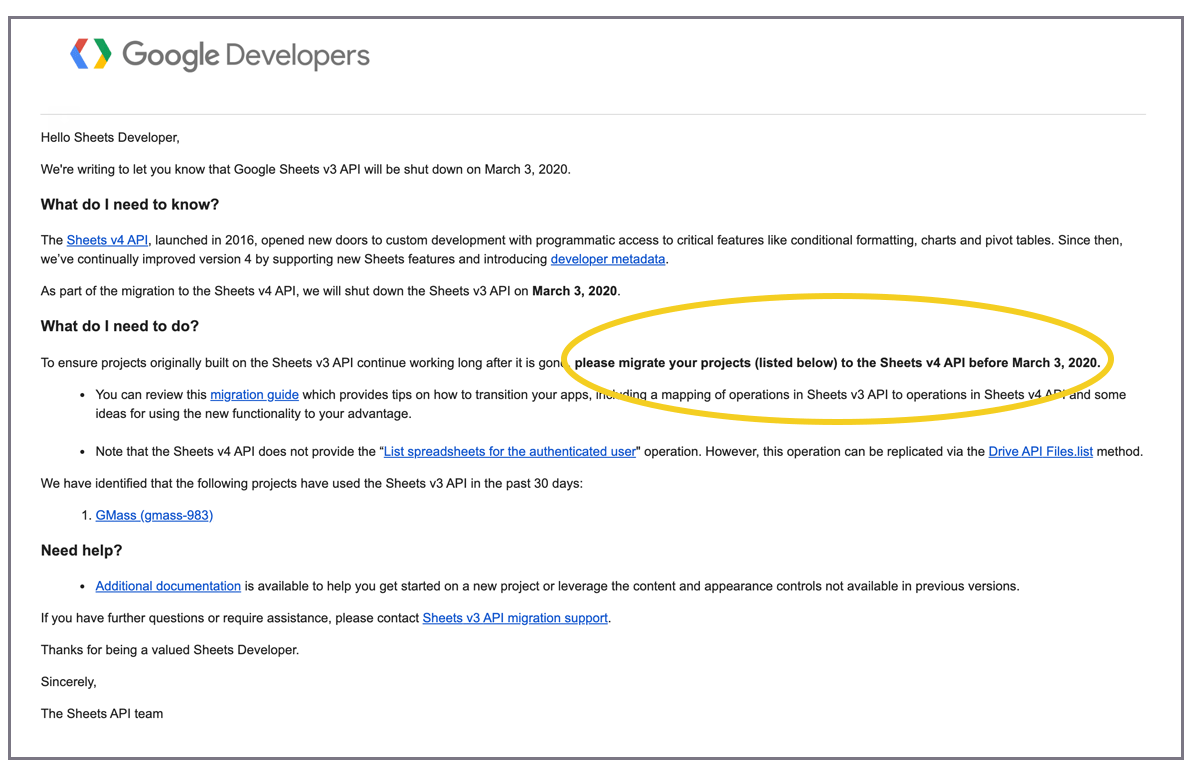
The changes pose several issues for developers, because not all functionality available in v3 is available in v4. You wouldn’t know it from reading Google’s migration page though, which states:
“The v4 version is JSON-based, has an easier-to-use interface, and adds a substantial amount of functionality that is not possible in the v3 version.”
That may be true, but it also removes some critical functionality that developers have been relying on for years in v3.
Additionally, OAuth scope changes between v3 and v4 will also force developers to go through a nasty OAuth re-verification process if they still want the ability to list all of the user’s spreadsheets.
While there may be plenty more issues than I’ll highlight here, I’ve included the issues most relevant to my work.
Listing all the Google Sheets in a user’s account is now complicated
The v3 API made this easy, providing a specific endpoint the inside the https://spreadsheets.google.com/feeds scope. The v4 API makes this harder. You must have access to either the https://www.googleapis.com/auth/drive.readonly or https://www.googleapis.com/auth/drive scopes, and the method to retrieve spreadsheets is now based on a query against all Google Drive files:
https://www.googleapis.com/drive/v3/files?q=mimeType%3D'application%2Fvnd.google-apps.spreadsheet'
You have to read the files from the user’s Google Drive, which requires the additional scope, and requires permission to read all the files on the user’s Google Drive, not just Sheets. This not only poses a greater security risk for the user, but is likely to scare the user, resulting in abandonments of the OAuth login process. The warning that a user sees goes from this:
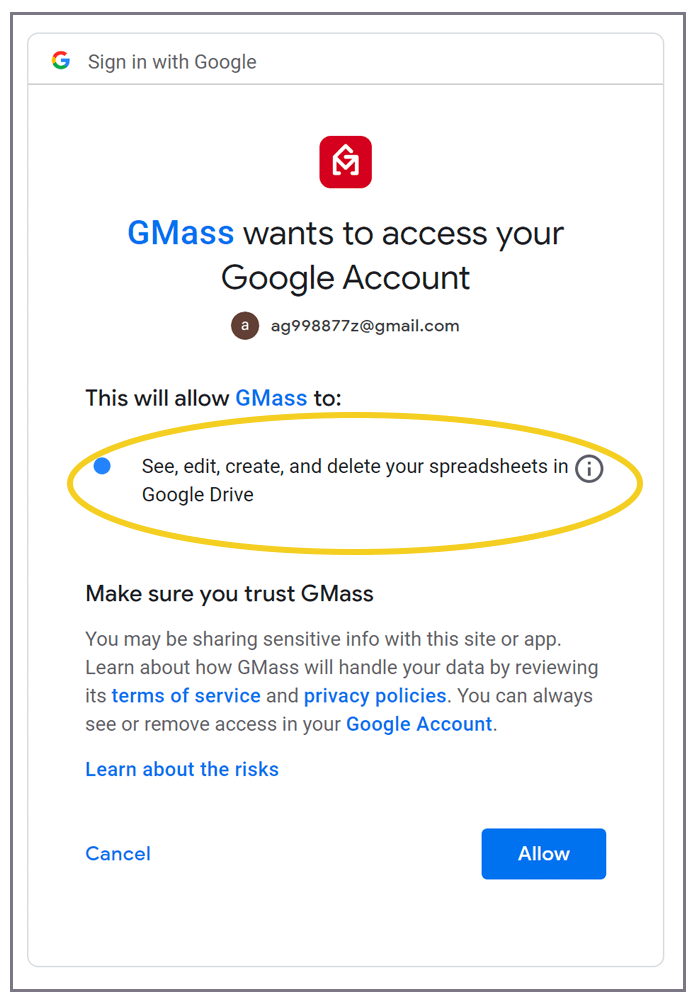
to this:

Finally, as detailed in Google’s Restricted API FAQ, the “drive” and “drive.readonly” scopes are becoming restricted scopes. That means that if your Cloud Console App previously did not require verification and a security assessment, the forced migration to v4 will require this, and will necessitate an expensive security assessment.

If your app was previously verified and passed the security assessment, you will now have to add the “drive” scope and submit for re-verification. As Google stated in my “approval” email notification, changing scopes in my Cloud Console and using them right away will cause users to see the “unverified app” screen.

In Google’s defense, however, simply adding an unverified scope to your OAuth Consent Screen does not automatically switch your users back to the Unverified App screen. Only if you request that scope in your OAuth flow code, will users see the Unverified app screen. This means that you can safely add the “drive” or “drive.readonly” scope to your Cloud Console Project, request it to be verified, and in the meantime while the OAuth Team is reviewing your request, avoid adding the scope to your OAuth flow code. Then, when the OAuth team verifies the new scope, you can finally add the scope to your flow, and that way your users will never have to see the Unverified app screen.

After you add a new scope, you’ll see it with a yellow warning triangle in your Consent Screen Settings. As long as your code doesn’t use the scope though, users will still see the Verified app screen if you’ve previously been Verified.
An Alternative Solution: The File Picker API
If you don’t want to bother with any of this complexity, you can also switch to the File Picker API, which is an API that launches a Google UI that lets your user pick a Sheet, or any file really, from Google Drive, without granting you the ability to see all the files in Drive. If your app is doing anything with Sheets, the main reason for needing to list all of a user’s Sheets is to get the Google “id” value of the Sheet. The File Picker API will retrieve the “id” of a Sheet for you, without exposing all the files to your code. It requires a different scope, https://www.googleapis.com/auth/drive.file, that is neither sensitive nor restricted. It just launches in a separate window and might break the flow of your own UI. In my Chrome extension, the user clicks a button within the Gmail UI and is then presented with a list of his Sheets.

Letting the user choose from a list of Sheets.
After the user chooses a Sheet, the list of Worksheets is then displayed. If I were to switch this to the File Picker API, then I’d first have to launch the Picker, let the user choose a Sheet, and then display a separate window to display the Worksheets inside the chosen Sheet, along with other metadata about the Worksheet. Thankfully, the File Picker API does let you filter the view to show only the user’s Sheets rather than all the files. If that wasn’t possible, it would add insult to injury, making you launch Google’s own UI, and then forcing the user to search for his Sheets.

The File Picker API lets you set it to only show a user’s Sheets.
TL;DR: The v3 API made it much easier to list a user’s Sheets and let them pick one. Migrating to v4 will scare your users and force you to go through an unpleasant OAuth re-verification process. You could switch to the File Picker API, but that won’t provide as seamless of a user experience as you’re used to.
Individual worksheets must now be queried by their names
This is a big deal and will 100% break your code if you’re reading user’s Sheets offline. In the v3 API, every “worksheet” inside an individual Sheet was assigned a unique identifier that was used to retrieve just that worksheet’s cell data. Even if the user changed the name of the Sheet from “Sheet1” to “Leads” for example, you could still pull the worksheet’s data because the unique identifier, which looked something like this (), didn’t change. In v4, however, the concept of unique identifiers for individual worksheets goes away, and you must now use A1 notation to pull cell data. You can probably already tell why this is problematic, but just in case, let me break it down:
- If you’re reading from a user’s Sheet offline, and the user changes the name of the worksheet, then future reads will break. With v3, it would still work.
- You must now support foreign characters, since worksheets can be named अजय (those are Hindi characters).
Even more interesting, is that this code-breaking change isn’t even mentioned as an issue in the Migration Guide.
You can’t query a Google Sheet like a database anymore
The v3 API allowed programmers to use “structured queries” to query a Sheet and return only the matching rows of the Sheet. This allowed for the complex data filtering to happen inside the Sheets API, and saved client bandwidth since only the relevant rows would be returned by the API. The concept of “structured queries” disappears in v4, and if you want rows matching a certain criteria, the only option is to return ALL ROWS and ALL COLUMNS of a Sheet and then filter the data in code on the client’s end.
For example, let’s say your spreadsheet has 100,000 rows. But you only want the 500 or so rows where the Column called “PurchaseYear” has a Row value of “2010”. Instead of retrieving just the 500 rows you want, your code has to retrieve all 100,000 rows and then find the 500 relevant rows on its own. To illustrate the absurdity of removing this feature, imagine if you Googled the phrase “best smartphone” while researching your next phone purchase. It would be like Google giving you all 1.4 billion search results on one page, unordered.

You might thing “Wait, this is wrong. I saw a way to do this in v4.” You’re probably thinking of the DataFilter type.
But that method only allows you to filter data by cell range, not by the values of the cells, which is what’s needed to be useful and to resemble an SQL query.
TL;DR: Removing support for “structured queries” removes the ability to query a spreadsheet’s data based on cell values. Developers must now retrieve a worksheet’s entire dataset rather than just the columns and rows they need.
The easy way to port your code
My backend is .NET, and using the .NET library for the v3 Sheets API, retrieving all the data in a spreadsheet results in an iEnumerable of CellEntry. The .NET library for v4, however, retrieves all the data in a new data type called ValueRange.
//The v4 way of getting all the cell data. CellsNew is a ValueRange type.
var CellsNew = service.Spreadsheets.Values.Get("128Etx8HZMtsF1mB2BGD0b6qXA4m5Qn-rVTRPku4nw4Y", "A1:C25000").Execute();

//The v3 way of getting all the cell data. CellsOld is an IEnumerable<CellEntry> type.
var CellsOld = new SheetsHelper(token).GetCells("128Etx8HZMtsF1mB2BGD0b6qXA4m5Qn-rVTRPku4nw4Y/private/full/od6");
Since most of my code deals with analyzing the cell data in a Sheet, rather than migrate all of my code to use the ValueRange type, I made a strategic decision to keep using the old data type of iEnumerable<CellEntry>, and simply wrote a conversion function to convert the new type of ValueRange to the old type of iEnumerable<CellEntry>.
public static Google.Apis.Sheets.v4.Data.GridRange ToGridRange(string a1range)
{
// trim off sheet name
if (a1range.Contains("!"))
{
a1range = a1range.Split('!').Last();
}
string[] vals = a1range.Split(':');
var c1 = ToRowColumn(vals[0]);
var c2 = ToRowColumn(vals[1]);
return new Google.Apis.Sheets.v4.Data.GridRange
{
StartColumnIndex = c1.Item1,
StartRowIndex = c1.Item2,
EndColumnIndex = c2.Item1,
EndRowIndex = c2.Item2
};
}
public static Tuple&amp;lt;int, int&amp;gt; ToRowColumn(string a1cell)
{
string ALPHABET = "ABCDEFGHIJKLMNOPQRSTUVWXYZ";
string first = string.Empty;
string second = string.Empty;
CharEnumerator ce = a1cell.GetEnumerator();
while (ce.MoveNext())
if (char.IsLetter(ce.Current))
first += ce.Current;
else
second += ce.Current;
int i = 0;
ce = first.GetEnumerator();
while (ce.MoveNext())
i = (26 * i) + ALPHABET.IndexOf(ce.Current) + 1;
string str = i.ToString();
return new Tuple&amp;lt;int, int&amp;gt;(i - 1, Int32.Parse(second) - 1);
}
public static IEnumerable&amp;lt;CellEntry&amp;gt; ToCellEntries(Google.Apis.Sheets.v4.Data.ValueRange valueRange)
{
var gr = ToGridRange(valueRange.Range);
uint rowIndex = (uint)gr.StartRowIndex.Value;
foreach(var row in valueRange.Values)
{
uint colIndex = (uint)gr.StartColumnIndex.Value;
foreach (var cell in row)
{
yield return new CellEntry
{
Row = rowIndex + 1,
Column = colIndex + 1,
Value = "" + cell,
};
colIndex++;
}
rowIndex++;
}
}
Now I can just use this line to convert from the new datatype to the old:
var cellsNewToOld = ToCellEntries(CellsNew).ToList();
This makes my migration much easier, since now all I have to do is change the code that pulls the data, not the code that analyzes the data.
In conclusion, I’m frustrated
These two functions are the essence of how I personally use the Google Sheets API, and I’m shocked that Google is forcing a migration to v4 without making these two functions easy. But then again, I probably shouldn’t be, because Google has had a habit of making things increasingly harder for developers recently. Still though, I’ll slog through the changes, and the world will go on.
I haven’t yet started the migration for GMass yet, but when I do, it’s likely I’ll find even more problems. I’ll update this post with anything else I find.
Resources
The official announcement from the Sheets API Team.
The official migration guide.
My live update page on the exhausting OAuth verification process.
Only GMass packs every email app into one tool — and brings it all into Gmail for you. Better emails. Tons of power. Easy to use.
TRY GMASS FOR FREE
Download Chrome extension - 30 second install!
No credit card required

Ajay is the founder of GMass and has been developing email sending software for 20 years.