
I’ve gone through my support emails recently, and these are the most frequently asked tech support questions, so if you’ve experienced any of the following, now you’ll know why and how to resolve it:
1. Open tracking or click tracking reports aren’t showing up
If you had “Open Tracking” or “Click Tracking” checked and still aren’t getting the correct reporting, it’s likely because your email was sent as Plain Text rather than HTML email. This can be adjusted in the lower right corner of the Gmail Compose window here:
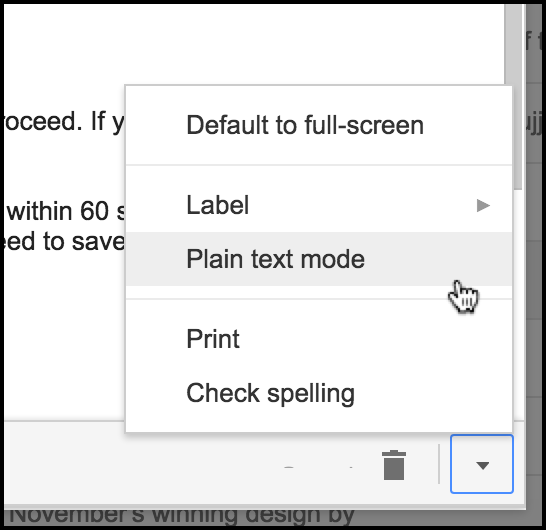
We recently discovered a bug where if you started by connecting to a Google Sheets spreadsheet or by using “Build Email List” button, then the Compose that launched defaulted to Plain Text mode. Unless you set it to HTML yourself or you took an action in the editor, like making text bold, adding an image or hyperlink, then your email might have been sent as Plain Text and opens wouldn’t have tracked.
We’ve now resolved this, however, so that the Compose will always load in HTML mode, so you won’t need to adjust this yourself.
Some users have reported they can’t find the Reports, even though they are present. There is a tiny expansion arrow to the left of the “GMass Reports” label. Be sure to click that to see the sub-Labels, which include Open Tracking, Click Tracking, and Unsubscribes.
2. Mail-merge personalization didn’t work
If you used personalization variables in your Subject or Message like “FirstName” or “LastName”, surrounded by of course, and the right value wasn’t substituted, there are two likely causes:
a. You connected to Google Sheets, but your spreadsheet wasn’t formatted properly. The first row in your spreadsheet should contain column headings, like “First Name”, “Last Name”, “Email Address”, “Company”, etc. The actual data should start on the second row. Also, if you change those column headers after you connect your Google Sheet to your GMass campaign, that will throw off personalization.
b. You hit the blue Gmail send button rather than the red GMass send button to send your campaign. You have to hit the GMass button for all GMass functionality, including mail merge, to work.
3. Emails take too long to send
Our system was just too busy.
Update December 2015: This issue has been resolved. a) We re-architected a portion of our code so that sending is super-fast now. Now, your campaign should always start sending within 60 seconds, unless of course you’ve scheduled it for the future. We’ve also disabled the “Save list as” function, because it is slow, and because we’re developing a feature which will eliminate the need to save a list entirely: you’ll soon be able to choose the recipients of any past email campaign to load into the To field.
4. The GMass buttons disappeared
If you’ve experienced a disappearing GMass button, it’s likely due to:
a. Extension has become disabled. In rare cases, the GMass extension may have become disabled. Type “chrome://extensions” in your address bar, and make sure the checkbox is checked next to GMass.
b. Conflicts with another browser extension. Several users have reported that they had Sidekick by Hubspot installed, and that prevented the GMass button from showing. Go to chrome://extensions and try disabling other extensions, but leave GMass enabled, and then reload Gmail in Chrome.
c. Failure to reload Gmail after installation. If you installed GMass but then didn’t re-load Gmail in your browser, the buttons may not show.
d. The GMass server is down. If the GMass server has gone down, the buttons will also disappear until the server comes back up. This is rare, but be sure to check the GMass Twitter feed for any reports of outages.
e. A network issue between your computer and a resource upon which GMass relies. Try accessing both www.gmass.co and www.inboxsdk.com in your browser, and make sure both websites load.
But most of the time, simply closing your tab/browser and reopening Gmail will take care of this.
5. Clicking the GMass button has no effect
It’s likely that you accidentally disabled GMass by clicking a checkbox disabling JavaScript for GMass. This post details this issue, but it can be corrected by shutting down Chrome and restarting and reloading Gmail.
Stay tuned for our announcement later this week! We’re releasing a feature that will let you send email campaigns to up to 10,000 people at a time!
Email marketing, cold email, and mail merge all in one tool — that works inside Gmail
TRY GMASS FOR FREE
Download Chrome extension - 30 second install!
No credit card required

Ajay is the founder of GMass and has been developing email sending software for 20 years.