You can now restore a deleted Gmail Draft

GMass uses Gmail Drafts as the storage mechanism for every mail merge campaign you send. After GMass is finished sending the mail merge campaign, it deletes the Draft, because it no longer has any use for it. If you, however, accidentally delete a campaign’s Draft before it or its auto follow-ups finish sending, then you may wish to recover the Draft.
If you’ve deleted your Draft and one of these is true…
- The campaign has NOT finished sending yet, because it’s scheduled to send a certain number of emails per day.
- The campaign HAS finished sending, but it has auto follow-ups assigned to it, and not all auto follow-ups have been sent.
…then you should attempt to recover the Draft.
If the campaign hasn’t finished sending, you will need to recover the Draft to allow the campaign to finish sending to all of your recipients.
If the campaign has auto follow-ups, you may want to recover the Draft if you wish to make changes to any of the auto follow-up settings.
If your campaign has finished sending, but still has pending auto follow-ups, but you don’t wish to make any changes to your auto follow-up settings, then you don’t need to recover the campaign’s deleted Draft.
So, how do you recover the mail merge campaign’s Draft if you accidentally deleted it?
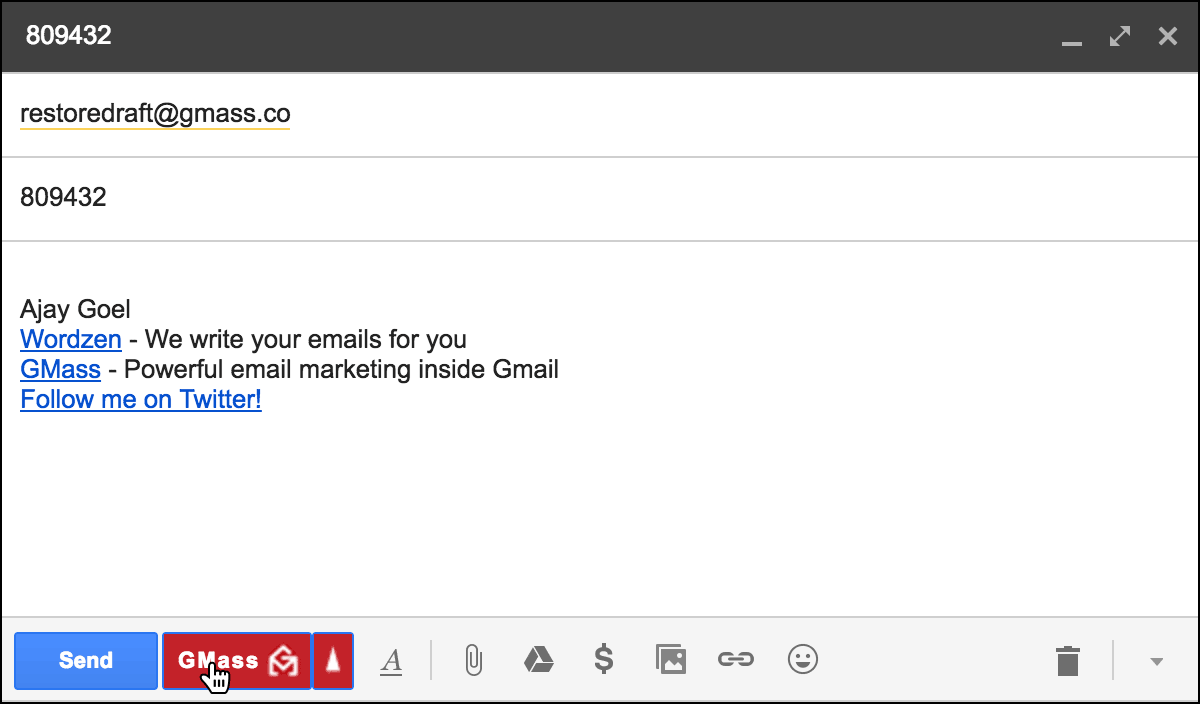
- Click Compose to launch a new window.
- Set the To field to restoredraft@gmass.co.
- Set the Subject to the numeric ID of the campaign whose Draft you want to restore.
- Hit the GMass button. Do not hit the Send button.
If successful, the Draft will be recovered, and you’ll find it under either:
- The Gmail Drafts Label
- The GMass Scheduled Label
- The GMass Auto Followups Label
Wherever you find it, it’s only one Draft, and based on the state of the campaign, it may have one or more of the above Labels attached to it.
- If the campaign has finished sending but has pending auto follow-ups, it will have just the GMass Auto Followups Label applied to it.
- If the campaign is in the middle of sending and also has pending auto follow-ups, it will have BOTH the GMass Scheduled and the GMass Auto Followups Labels applied to it.
- If the campaign has finished sending but does NOT have any auto follow-ups, it will have just the GMass Scheduled Label applied to it.
- If the campaign has finished sending and does NOT have any auto follow-ups, then it won’t have any Label applied to it other than the standard Gmail Drafts Label.
What do the Gmail Labels mean?
If a Draft has the GMass Scheduled Label, that means it’s a pending mail merge campaign and emails will still be sent. If the GMass Scheduled Label is removed, the campaign will fail to send.
If a Draft has the GMass Auto Followups Label, that means the campaign has auto followups attached to it. This Label is simply for organizational purposes, so you the user, can easily see which campaigns still have pending auto followups. Whether this Label is applied to the Draft or not has no bearing on whether the auto follow-ups send or not.
I don’t use GMass, I deleted an important Gmail Draft, and I want to recover it
If the Gmail Draft you deleted has nothing to do with GMass, and you still want to recover it, try following the tricks in this awesome article.
Only GMass packs every email app into one tool — and brings it all into Gmail for you. Better emails. Tons of power. Easy to use.
TRY GMASS FOR FREE
Download Chrome extension - 30 second install!
No credit card required

Ajay is the founder of GMass and has been developing email sending software for 20 years.