Auto Follow-Up Options In Gmail | Gmass Blog

We’ve introduced a new enhancement to our popular auto follow-up feature which will send sequential follow-up emails in stages to people until they reply (or open, or click, or “reply or click“). Now you can set your auto follow-ups so that if you’re sending email to multiple people at a company or organization, if any one person at the organization replies, the follow-ups to everyone at that organization will stop. This option is useful if you’re cold emailing multiple people at an organization with the goal of getting just one of them to reply. If your goal is to get everyone at an organization to reply, you would not want to use this setting. This setting is OFF by default and needs to be turned ON if you wish.
This setting works by examining the domains of your recipients and stopping email to any domain that matches the domain of anyone that’s responded, with the exception of popular consumer domains.
For example, let’s say you’re cold emailing to pitch your corporate catering services, and your original email goes to 3 employees at Uber as well as 2 @yahoo.com addresses:
jack@uber.com
jane@uber.com
joe@uber.com
brian@yahoo.com
ben@yahoo.com
After your initial email, nobody responds. Your Stage 1 auto follow-up then goes out 3 days later, and jane@uber.com responds and ben@yahoo.com responds. Because jane@uber.com responded, the auto follow-ups to jack@uber.com and joe@uber.com will now also stop, if this setting is on. However, brian@yahoo.com will still continue to receive auto follow-ups because yahoo.com is a consumer domain, so the fact that ben@yahoo.com responded doesn’t affect brian@yahoo.com.
Because this setting works based on domain matching, if, for example, you had sam@uber.net on your list, sam@uber.net would continue receiving the auto follow-ups because uber.net is a different domain than uber.com. FYI, this is just an example, and it turns out that uber.net isn’t even owned by the real Uber.
When you activate this setting, it applies to your entire account, meaning it will apply to all campaigns with “no reply” auto follow-ups sent from your account. You can’t set this on a per-campaign basis. Also, it does not apply to auto follow-ups that are sent based on opens, clicks, or to ALL — it only applies to auto follow-ups that are based on replies.
To toggle this setting on and off:
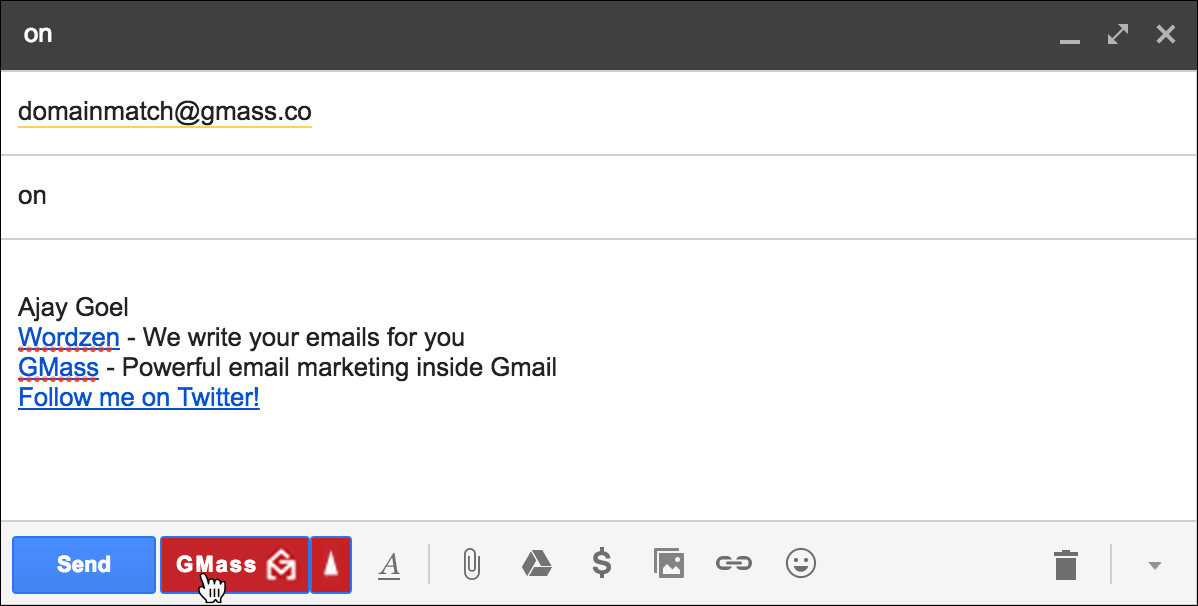
- Click Compose to launch a new window.
- Set the To field to domainmatch@gmass.co.
- Set the Subject to the word on or off.
- Leave the Message blank.
- Hit the GMass button. Do not hit the Send button.
Send incredible emails & automations and avoid the spam folder — all in one powerful but easy-to-learn tool
TRY GMASS FOR FREE
Download Chrome extension - 30 second install!
No credit card required

Ajay is the founder of GMass and has been developing email sending software for 20 years.